AirNav Radar Tool You Should Be Using: Airport View
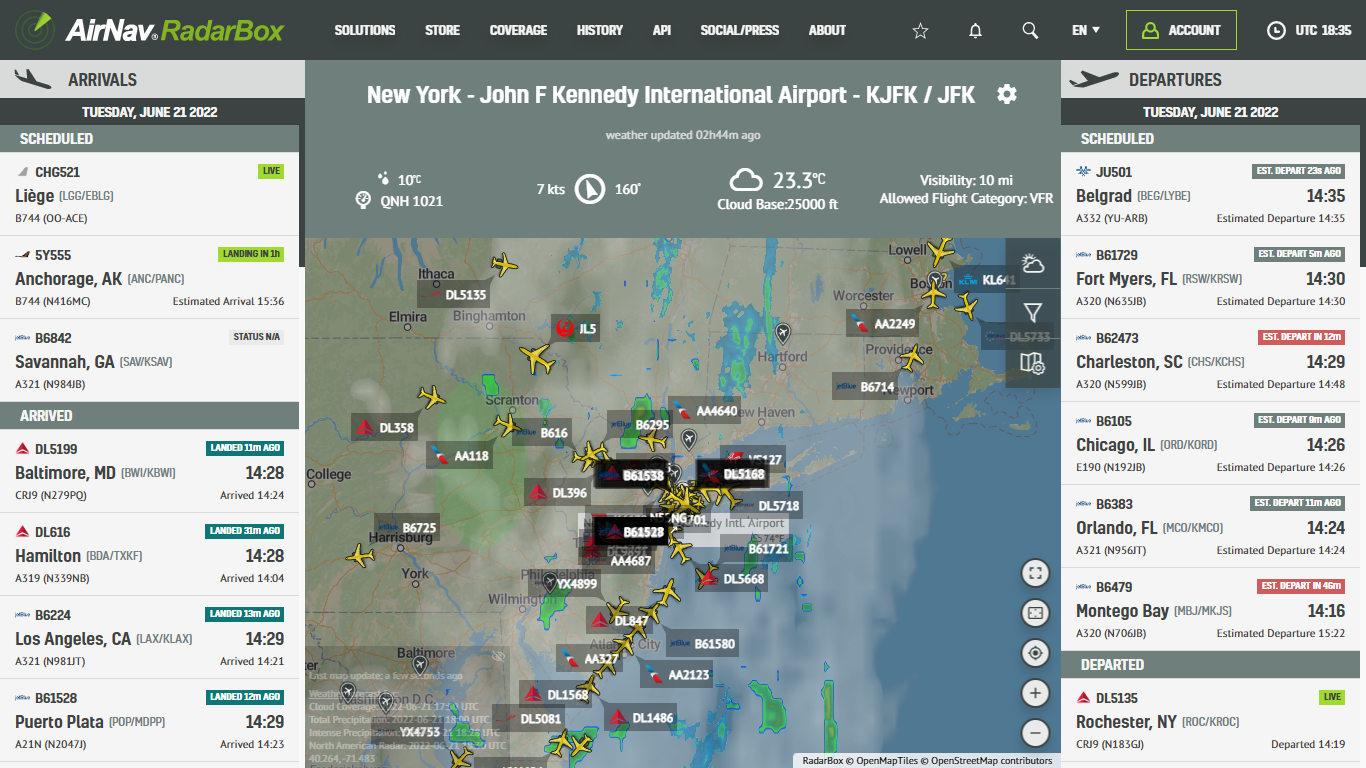
Airport View provided by AirNav RadarBox
AirNav Radar's Airport View displays a particular airport's live inbound (arrivals) and outbound flight traffic (departures) within a single window. It is an excellent secondary tracking resource for Air Traffic Controllers and plane spotters - who intend to follow the flight movements (arrivals & departures at a specific airport worldwide. Airport View also displays the prevailing weather conditions at an airport, with weather information such as wind speed & direction, visibility, pressure, and cloud base can be viewed.
To access and use this tool, go to AirNavRadar.com and "Solutions", "Flight Tracking", and "Airport View". It is worth noting that this feature is only available for Business accounts.

Select the settings icon at the airport view's top right.

Type the airport name or ICAO or IATA code and click on up. In the screenshot, for example, we've selected London Heathrow Airport (LHR/EGLL).

After entering the name of the airport you want to be displayed in Airport View, just click "Save".

Simple, isn't it?

Besides the viewing of live inbound and outbound flight traffic of a specific airport, AirNav Radar provides a variety of weather layers, filters, and map options so you can customize the map the way you want.